3D Illustration Icon Gadget Bundle for Creative Projects
If you're working on a design project, whether it's for your website, print materials, or digital presentations, finding the right visuals can make all the difference. The 3D Illustration Icon Gadget Bundle offers a convenient and high-quality solution to elevate your work with modern, professional icons that are both versatile and visually appealing.
What Is the 3D Illustration Icon Gadget Bundle?
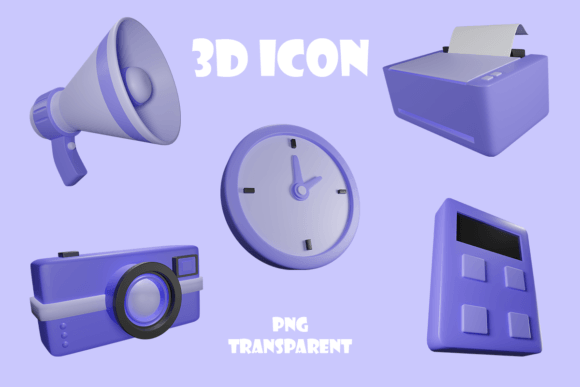
The 3D Illustration Icon Gadget Bundle is a collection of ten meticulously crafted 3D icon designs, each representing a common gadget such as a calculator, camera, clock, headphone, tablet, megaphone, microphone, PC desktop, printer, and speaker. These icons are delivered in a zip folder containing PNG files with transparent backgrounds, at an impressive resolution of 3000x3000 pixels. Each one is a 3D render, meaning they have depth, lighting, and textures that bring them to life compared to flat vector icons.
This bundle is ideal for anyone who needs to add realistic tech elements to their visual content. It’s especially useful for graphic designers, marketers, educators, bloggers, and small business owners looking to create engaging and professional-looking assets without spending hours designing from scratch.
Key Features of the 3D Icon Gadget Bundle
- High Resolution: At 3000x3000 pixels, these icons are perfect for large-scale printing or detailed digital displays.
- Transparent Backgrounds: Each PNG file has a clean, transparent background, making it easy to place the icons over any color or image.
- Realistic 3D Rendering: The use of advanced rendering techniques ensures that the gadgets look lifelike and modern.
- Ready-to-Use Format: No need for complex software—just download the zip folder and start using the icons immediately in your projects.
- Wide Range of Devices: Includes essential gadgets like calculators, tablets, speakers, and more, covering a variety of tech-related themes.
Why You Should Consider This Bundle
Whether you're creating a presentation for clients, designing marketing materials for your business, or just enhancing your blog posts, having access to premium 3D icons can significantly improve the quality of your output. Here’s why this bundle stands out:
- Saves Time: Instead of searching for individual icons across different platforms or hiring a designer, you get everything you need in one package.
- Boosts Visual Appeal: The 3D effect adds realism and sophistication to your designs, helping you stand out in a crowded market.
- Adaptable to Many Uses: From websites to social media, product packaging to infographics, these icons fit into a wide range of creative and commercial applications.
- Cost-Effective: A single purchase gives you ten high-quality icons, making it a great value for creators and businesses alike.
Perfect for Graphic Design Needs
Graphic designers often need to represent technology in their work, whether it's for UI/UX mockups, app interfaces, or branding materials. The 3D icon gadget bundle provides a consistent visual language that helps maintain professionalism and cohesion in your designs. For example, if you're building a tech startup's website, including icons for a camera or microphone could help illustrate features like video conferencing or voice recording tools clearly and stylishly.
Ideal for Print Products
When it comes to print products like brochures, posters, or product manuals, clarity and detail matter. The high-resolution PNG files in this bundle ensure that your printed materials remain sharp and vibrant. If you’re showcasing audio equipment, adding a 3D speaker or headphone icon will give your brochure a polished, informative look that appeals to customers.
Business Applications of the 3D Icon Gadget Bundle
For entrepreneurs and business owners, visuals play a key role in communication. The 3D illustration icon gadget bundle can be used to create:
- Infographics explaining how your tech-based services work
- Product listings for online stores selling gadgets
- Presentation slides during investor pitches or team meetings
- Custom illustrations for service pages (e.g., using a microphone icon for a podcasting service)
- Training materials where visual cues help users understand workflows
Imagine you run an IT support company. By using the 3D icons for a PC desktop or a printer, you can visually guide clients through troubleshooting steps, making the process easier to follow and more engaging.
Use Cases for Educators and Freelancers
Educators preparing digital lesson plans can benefit from using these icons to break up text and highlight important points. For instance, a teacher explaining time management might use the 3D clock icon to emphasize deadlines or schedules.
Freelancers who work across multiple industries can keep a copy of the 3D icon gadget bundle in their toolkit. Whether they’re designing for a music production client or a tech firm, the icons offer a quick way to add relevant, eye-catching imagery to their deliverables.
How to Use the 3D Icons Effectively
Here are some beginner-friendly tips for integrating the icons into your workflow:
- Layer Them in Photoshop: Use the transparent PNGs to overlay on backgrounds or within compositions to add depth and context.
- Insert into PowerPoint or Canva: Drag and drop the icons into your slides or designs for instant visual enhancement.
- Include in App or Website Mockups: Showcase gadgets like tablets or headphones in your interface designs to provide real-world context.
- Create Social Media Content: Pair the icons with short captions to explain features, benefits, or usage of a product or service.
- Print for Physical Materials: Use the high-res PNGs for flyers, posters, or even branded merchandise like mugs or T-shirts.
A practical example would be a blogger writing about home office essentials. By incorporating the 3D icons of a calculator, PC desktop, and speaker, they can visually enhance the post while keeping the message clear and organized.
Things to Keep in Mind Before Using the Bundle
Before downloading the 3D illustration icon gadget bundle, there are a few things to consider:
- License Terms: Make sure the icons come with a license that allows for your intended use—whether personal, commercial, or educational.
- Style Consistency: While the icons are professionally designed, check if they match the overall style of your project. Some may require slight adjustments in color or size.
- Software Compatibility: Since they are PNG files, most editing tools will support them. However, always verify compatibility with your preferred design platform.
- Storage and Organization: After unzipping the folder, store the icons in a well-organized directory so they’re easy to find when needed.
Getting Started with Your 3D Icon Collection
Using the 3D icon gadget bundle doesn’t require advanced skills. Just open the zip folder, select the icons you need, and insert them into your project. Here’s a simple scenario to get you started:
You're designing a flyer for a new photography course. To make it visually appealing and informative, you could:
- Place the 3D camera icon next to the headline “Capture Life Like Never Before.”
- Add the 3D tablet icon beside a section titled “Learn Editing Techniques.”
- Use the microphone icon to represent live critiques or Q&A sessions.
This approach not only makes the flyer more attractive but also helps readers quickly grasp the key components of the course.
Combining Icons with Text and Color
To maximize impact, pair the 3D icons with concise text and complementary colors. For instance, using a bright blue microphone icon with dark text on a white background creates a clean and professional look suitable for marketing collateral or web banners.
Another idea is to adjust the color of the icons slightly to match your brand palette. Most photo editing tools allow you to change the hue or apply filters without losing the transparency or quality of the image.
Conclusion: Enhance Your Designs with Realism and Efficiency
The 3D Illustration Icon Gadget Bundle is more than just a set of images—it's a powerful tool for improving the clarity, aesthetics, and effectiveness of your visual communications. With its high resolution, transparent backgrounds, and diverse selection of gadgets, it caters to both casual users and professionals who want to streamline their design process without compromising on quality.
Whether you're a marketer crafting a new campaign, a student putting together a digital portfolio, or a small business owner updating your website, this bundle has something to offer. Its ease of use and adaptability make it a valuable addition to any creative toolkit.